
 Switch to Kodezi Code
 Kodezi CLI
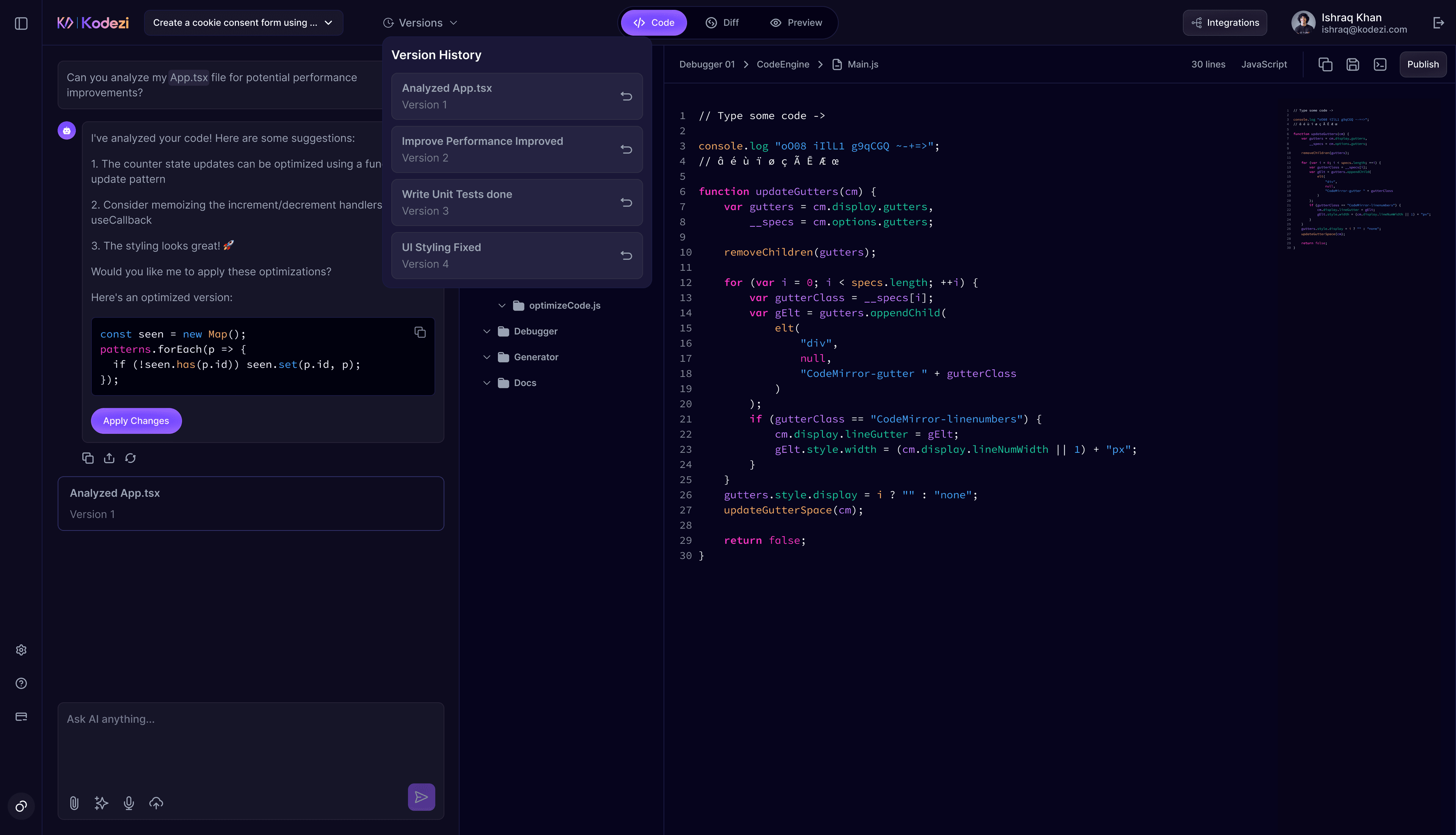
Version Control & History
Learn how Kodezi Create tracks changes, saves snapshots, and allows you to revert or restore any project version.
Kodezi Create automatically tracks your project changes through built in versioning. Every major update, whether AI generated or manually edited is saved as a snapshot, allowing complete visibility and control over your development workflow.
Project Versioning
Kodezi Create saves version snapshots whenever important changes occur. These snapshots allow you to:
- Track every update made by you or Chronos-1
- See exactly what changed using the diff view
- Restore previous versions with a single click
- Monitor project evolution over time
Snapshots are created during:
- Initial project creation
- AI generated changes
- Manual code edits
- Dependency updates
- File or folder modifications
Reverting Changes
If Chronos-1 makes an update you don’t want, reverting is simple:
How to undo the most recent change:
- Click the Undo icon in the chat panel
OR - Type "Revert the last change" in the chat
Once you do this:
- Your project returns to the previous snapshot
- All recent changes are undone
- You can open Version History to restore even earlier versions if needed
Restoring versions is always safe — nothing is lost, and you can move backward or forward anytime.