
 Switch to Kodezi Code
 Kodezi CLI
Subscription Plans & Credits
Learn about subscription tiers and credit usage for the Kodezi Web IDE.
Kodezi Web IDE offers flexible plans with different features and monthly credit limits. This page explains the available plans and how credits work within the Web IDE.
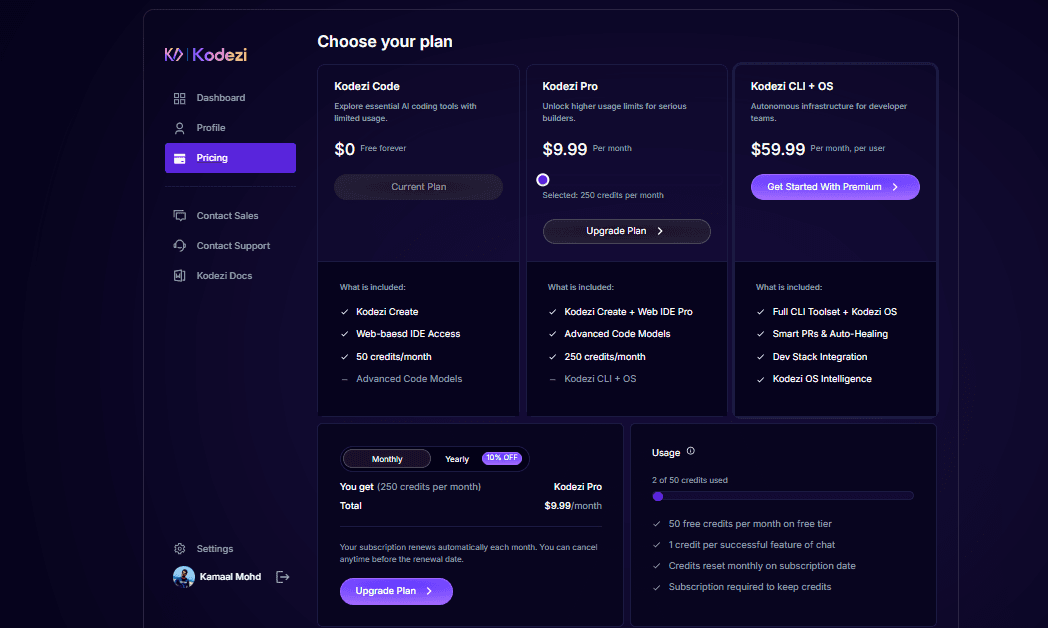
Subscription Plans
Price: $0 - Free Forever
Includes:
- Kodezi Create
- Web-based IDE Access
- 25 credits per day FREE
- Advanced Code Models
This plan is ideal for learners and users who want access to essential AI coding tools with limited monthly usage.
Price Options:
- 100 credits per day - $9.99
- 250 credits - $24.99
- 500 credits - $49.99
- 1000 credits - $79.99
Includes:
- Kodezi Create + Web IDE Pro
- Advanced Code Models
Perfect for developers who need consistent credits, advanced AI features, and higher usage limits.
Price Options:
- 100 credits per day - $9.99
- 250 credits - $24.99
- 500 credits - $49.99
- 1000 credits - $79.99
Includes:
- Full CLI Toolset
- Smart PRs & Auto-Healing
- Dev Stack Integration
Best suited for professional developers and engineering teams who require automation, intelligent debugging, and workflow integration.
Manage Credits
You can view your credits directly inside the My Subscription section in the Web IDE sidebar.
You can check:
- Remaining credit balance
- Monthly credit usage bar
- Your active plan
- Upgrade options
- Next reset date
How Credits Are Used
Credits are consumed whenever you use AI features inside the Kodezi Web IDE.
Credit Rules:
- 1 credit per successful request or AI operation
- Credits reset monthly based on your billing cycle
- Free users get 50 credits/month
- Pro users get 250 credits/month
Tips to Save Credits
- Use clear prompts
- Combine multiple edits into a single request
- Use undo or small tweaks before generating again
- Review output before requesting changes
Subscription Management
Your plan renews automatically each month. You can cancel anytime before renewal via:
Account Settings → Subscription
Your plan stays active until the current billing cycle ends.